

#su TryNotToBreakAnything.sh
We've talked a lot about root and Android in the past five years. We've discussed the good, we've discussed the bad. We'll keep talking about both, because root on Android, like Android itself, is a constantly evolving thing.
As Android matures, the wide-open style of root access we may have grown used to with legacy versions has gone away. Because Android is designed for mobile devices, the focus is on security — specifically the security of your life's data you might have stored away on that screen in your pocket. We've seen Android go from the wild-west days of unfettered Superuser access, to locked down and tamper-proof (well, they try to be) devices meant for folks who need the extra level for their business details. For some of us, this is a hinderance and we don't want Google or the folks who made our phone trying to protect us from ourselves. But for each person who needs — or thinks they need — unfettered root access there are thousands, if not tens of thousands, who just want their data to stay safe. Those people are who our phones get built for, and we're left to exploit as best we can.
Root itself is just a user with elevated permissions, who can do anything to any file or folder in the system. It's often dangerous, always powerful, and an integral part of Linux. Android is the most popular "version" of Linux in the world (as well as the most popular computing system), but as we discussed above superuser access is more restricted than it is on other Linux systems. We don't have to like this, but there is little we can do to change it other than build our own from the AOSP. While I think anyone and everyone interested in building Android themselves should look into it, for now we have to stay in the limits that Security Enhanced kernels and Knox have given us.
If you've read this far, congratulations. Enough talk. It's time to root that device, and we've got the links you need to get started.
Top devices
Here you'll find links to tutorials for the devices that are hot right now. Don't worry if yours isn't here, we've got a big list of archives further down the page.Galaxy S6
Galaxy S6 edge
LG G4
- coming soon
Galaxy Note 4
- coming soon
HTC One M9
- coming soon
Galaxy S5
- International, Korean, Canadian, USCC, and T-Mobile US models
- Verizon and AT&T models (including GS5 Active)
Galaxy Note 3
LG G3
Galaxy S4
HTC One M8
Nexus
Current devices
Here you'll find the tried and true Android favorites that are still current and popular, but not the newest models. If you're shopping for a phone just to root, these are the models you'll want to look at, while developers and hackers work on the latest hot devices to open their secrets.Nexus
Samsung phones
- Verizon Galaxy S3
- AT&T Galaxy S3
- Sprint Galaxy S3
- T-Mobile Galaxy S3
- Unlocked Galaxy S3
- Verizon Galaxy Note 2
- AT&T Galaxy Note 2
- Sprint Galaxy Note 2
- T-Mobile Galaxy Note 2
- Unlocked Galaxy Note 2
- Galaxy Round (If you have successfully rooted your Samsung Galaxy Round, please contact jerry@androidcentral.com)
HTC phones
- Verizon HTC One M7
- AT&T HTC One M7
- Sprint HTC One M7
- T-Mobile HTC One M7
- Unlocked HTC One M7
- Verizon HTC Droid DNA
- Sprint HTC EVO 4G LTE
- HTC One X (Qualcomm)
- HTC One X (Tegra)
- HTC First
Motorola phones
- Verizon Moto X
- AT&T Moto X
- Sprint Moto X
- Unlocked Moto X
- Moto G
- Verizon Droid Ultra
- Verizon Droid MAXX
- Verizon Droid Mini
- Verizon Droid RAZR HD
- Verizon RAZR MAXX HD
LG G2
Other LG phones
Sony phones
- Sony Xperia Z Ultra
- Sony Xperia Z1
- Sony Xperia Z1s — currently unavailable
Android tablets
- Nexus 7 (2013)
- Nexus 10
- Amazon Kindle Fire HDX This is a work in progress
- LG G Pad 8.3
- Samsung Galaxy Tab 3 8.0
- Samsung Galaxy Note 10.1 (2014)
- Samsung Galaxy Tab Pro 8.4
- Samsung Galaxy Tab Pro 10.1
- Samsung Galaxy Tab Pro 12.2
- Samsung Galaxy Note Pro 12.2
Legacy devices
Androids that work too well to just ignore. Some of our favorite devices are in this section, and rooting helps give them life a little longer than the manufacturer provides.If your device isn't listed here, we suggest you visit the Android Central forums and ask some of the root-savvy users you'll find there. This is your best bet at finding root for devices that are no longer as popular, but still very serviceable.
Nexus
Samsung phones
HTC phones
Motorola phones
Sony phones
ONE CLICK ROOTING TOOLS{PS not all devices are supported}
Best 8 Android Root Tools to Get Root Access with or without Computer
Finally you make up your mind to root your phone or tablet, but get stuck to selecting a right one from lots of Android root tools? You don’t have to. This article shares with you best 5 Android root software and best 3 Android root apps.Part 1. Best 5 Android Rooting Software to Root Android with Computer
In this part, I recommend best 5 root software for Android, which enables to root your phone or tablet from computer easily and conveniently.1. Wondershare MobileGo
Wondershare MobileGo is one of the best root software for Android you have ever seen. It’s an easy-to-use solution for rooting your Android phone or tablet in 1 click. Besides, it’s compatible with massive Android phones and tablets produced by Samsung, HTC, Sony, Motorola, LG, HuaWei, Acer, Google and more.Pros
- Fully compatible with Android 2.1 and up.
- 100% safe and secured, no risk.
- DOES NOT void warranty.
- Support over 3, 000 Android phones and tablets.
- Backup/restore import data before/after rooting.
- Manage rooted Android phone or tablet in one place.
- Free.
- Not offer unroot function for the time being.

4,986,434 people have downloaded it

2. Kingo
Kingo is another free software for Android rooting. Like Wondershare MobileGo, it also enables you to root your Android phone or tablet in 1 click. It supports Android 2.3 up to Android 4.2.2, and works well with HTC, Samsung, Sony, Motorola, Lenovo, LG, Acer, and so on.Pros
- Fully compatible with Android 2.3 up to Android 4.2.2.
- Enable to remove root at any time.
- Free of charge.
- Safe and risk-free.
- Not support Android 4.4 or up.

3. SRSRoot
SRSRoot is a little rooting software for Android. With it, you can root your Android phone or tablet, as well as remove root access with a single click. It’s free of charge and provides you with two ways to root. One is Root Device (All Methods) the other is Root Device (SmartRoot).Pros
- Work well with Android 1.5 up to Android 4.2.
- Support unroot.
- Not support Android 4.4 or up.

4. Root Genius
Like its name suggests, Root Genius is a smart Android root software created in China. It makes Android rooting simple, easy and fast.Pros
- Support more than 10,000 Android phones.
- One click to root, simple an easy.
- Enable to flash custom ROM, and remove built-in-apps after rooting.
- Compatible with Android from 2.2 to 4.4.
- Free
- Not offer unroot function for the time being

5. iRoot
Just like Root Genius, iRoot is another powerful root software created by Chinese people. Just one click, and you can be the master of your Android phone or tablet.Pros
- Support thousands of Android phones.
- High success rate of rooting.
- Free of charge.
- Not offer unroot function for the time being.

Android Manager - One Stop Solution to Manage Your Mobile Lifestyle
- One click to download, manage, import & export, transfer your music, photos and videos.
- One click Root your Android Devices to take full control.
- De-duplicate contacts, switch devices, manage your app collection, backup & restore and send messages from your desktop
- Mirror your android device to send messages, and play Android games on your computer
- Transfer Files among your mobile devices without limit
- Optimze your device on the go with the MobileGo app.
Part 2. Best 3 Root Apps for Android to Root Android without Computer
In this part, I recommend best 5 root software for Android, which enables to root your phone or tablet from computer easily and conveniently.1. SuperSU Pro
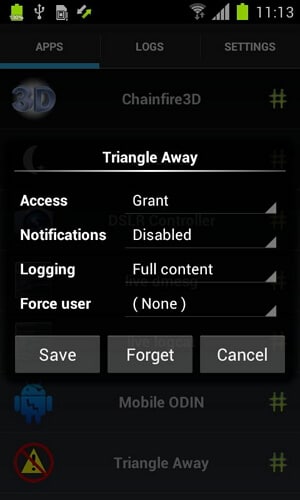
SuperSU Pro: SuperSU (Stands for super super user) is a root access
app for Android, which can grant or deny access to root whenever any app
requests root access. It will record your choice and allow those apps
to access root without prompting. It also makes a log of root accesses.
Features
Root access prompting, logging, and notifications.
Temporarily unroot or completely unroot your phone or tablet.
Work even when Android is not properly booted.
Wake on prompt.
Work as system app.
Accesses it by dialing *#*#1234#*#* or *#*#7873778#*#* from the dialer even it is hidden from the launcher.
4- Selectable themes Dark, Light, Light- Dark Actionbar, and Default device.
5- Selectable icons for the app.
Advantages
Smooth app, no extra load on CPU.
No advertisement.
Can be hidden.
Small in size, just 2.2MB space.
Disadvantages
You cannot lock the app with a pin, but this feature is added in the Pro version which is a paid version of this app.
Download SuperSU Pro from Google Play Store>>
Features
2. Superuser
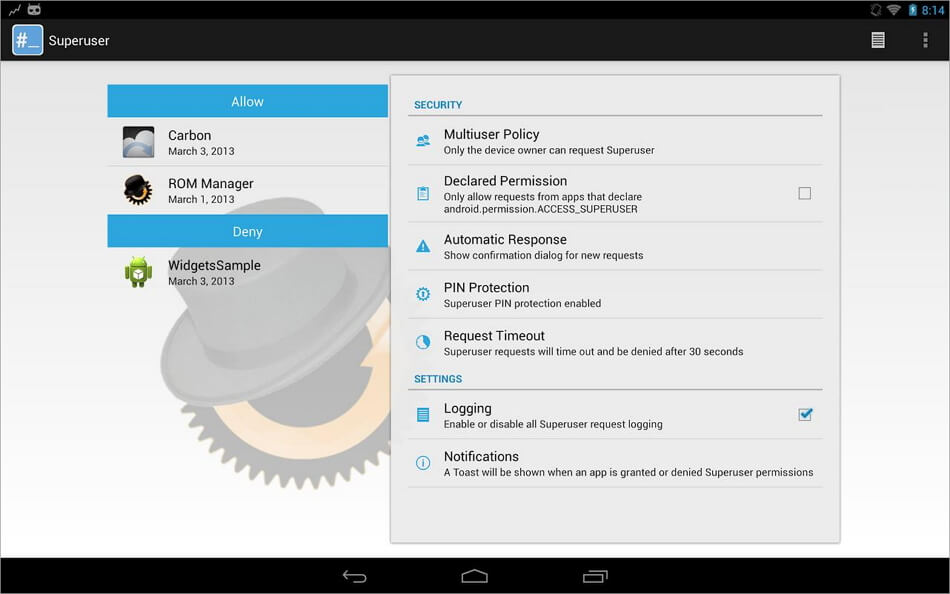
This app does almost the same as SuperSU. With this app you are going
to get PIN protection for the fee, which is available after paying for
it in the SuperSU.
This app is a little heavy compared to SuperSU, when it comes to CPU uses. The interface was not that good when the beta version was launched, but the official version is fine and runs smoothly. The developer of this app has announced that this app will always be free and no paid version will be launched ever.
Features
It provides multi user supports (android 4.2 onwards).
It is a totally open source project; you can find the source code at github.
PIN protection. It asks for PIN whenever it encounters a root access request.
Every app can be configured separately.
Root access prompting, logging, and notification features.
Advantages
It can handle multiple root access requests at a same time.
Updates very frequently in the marketplace, hence you will get added
support to all the new Android versions almost instantly.
You can set the duration of request before they time out.
If you are looking for a free app, then you cannot find any app
better than this one. You will never feel that you make a compromise by
not going for a paid app.
No security voids in this app, everything is transparent.
Disadvantages
This app is a little bit heavy in terms of CPU uses
The interface could be made better, but this can be of personal
preference. If I don't like the interface doesn't mean you will feel the
same.
Download Superuser from Google Play Store>>
This app is a little heavy compared to SuperSU, when it comes to CPU uses. The interface was not that good when the beta version was launched, but the official version is fine and runs smoothly. The developer of this app has announced that this app will always be free and no paid version will be launched ever.
Features
3. Superuser X [L]
It is an Android root app designed for experienced people or
developers, newbies or amateurs are advised to stay away from this app.
This app permits all the apps to access roots once the binary file gets
installed, you can also remove this app after that. Hence, you won't get
any pop ups asking for the permission to access the root, those pop ups
might be irritating for you if you use plenty of rooted apps. Using
this app you can stay away from that irritation.
Advantages
You will be getting the root access even if this app is uninstalled or gets corrupted once the binary file gets installed.
You can also uninstall the app after installing the binary file. Hence, you can save memory space.
Gives root access to every app without prompting for permission which can save your time, memory and CPU.
Disadvantages
The app is designed for developers and experienced user, if you feel
secure by giving the root access by prompting for it, then the app is
not for you.
If you are in a habit of downloading and installing random rooted
apps from the web, then the app is not for you. You might brick your
phone in that case.
Free version of this app shows some ads, to get rid of that, you should purchase the paid version.
This app is currently available for those Android devices which are running on the ARM processor.
The app is based on command line interface. Graphical user interface is not provided.
Download Superuser X [L] from Google Play Store>>
Advantages


No comments:
Post a Comment